


As part of an internal audit on a restricted VDI (Virtual Desktop Infrastructure) environment, we tested the existence of a new tool enabling content to be proxied through the RDP protocol to bypass the filtering rules in place.
Discover SOXY
There are a number of tools available for this type of communication. In particular, SocksOverRDP, , ica2tcp, , or even rdp2tcp. However, these projects lack the stability to carry out a long-term mission.
That's why the Airbus safety team recently created the soxy which solves these stability problems. It was presented at SSTIC 2025, the presentation video is available here with presentation slides. This article focuses on the use of soxy to establish SOCKS communication. However, it is much more comprehensive, To discover all these features, we recommend you read the readme available on the project's github page.
How SOXY works: virtual channels
Soxy uses the virtual channels of the RDP protocol to establish a SOCKS proxy. To sum up, a RDP virtual channel is a communication tunnel between the client and the RDP server. It can be used to transfer specific data to the remote office.
By hijacking this channel, it is possible to pass traffic from a SOCKS proxy through it: On the client side, network connections are redirected to this virtual channel, and on the server side, an application receives SOCKS requests and executes them, establishing connections on the client's behalf. In this way, the client can pass its network traffic through the RDP session, like a secure tunnel, without opening an additional port on the network.
Using SOXY
The tool's operation is based on two elements, the backend of soxy, which will be executed on the VDI. To do this, the project offers a binary in executable format or a library (DLL). In our case, we'll use the DLL. The second element is the frontend, which is deployed on the client that establishes the RDP connection to the VDI.
In the case of the audit, it's the offensive suite exegol to be used with the customer xfreerdp. You'll need to add the libsoxy.so library to the xfreerdp to call it at runtime.
The xfreerdp tool is used to connect to the bounce server via RDP with the following command line:
$ xfreerdp /u:<user> /p:<password> /v:<Serveur de rebond> /cert-ignore /dynamic-resolution /log-level:INFO /drive:pentest,/workspace /vc:soxy The /vc option is used to specify a virtual channel to be used. In the following case, soxy is chosen.

In addition, a file share is set up between the offensive VM and the rebound server via the /drive option to access the soxy.dll library. This DLL will be run remotely here, as we had encountered difficulties with the security solution implemented on the server.
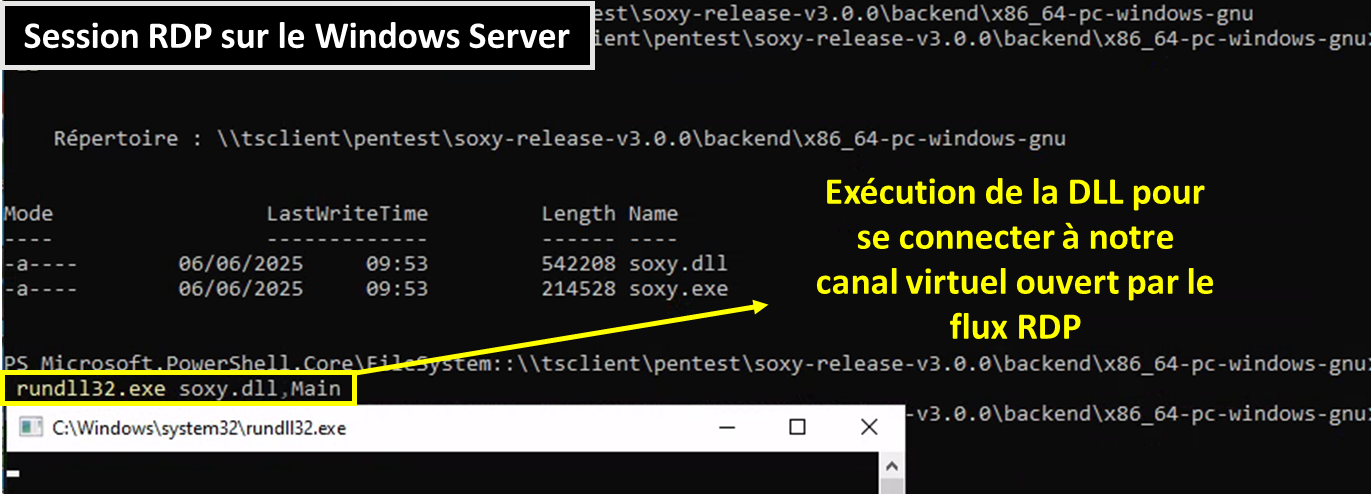
It is now possible to communicate with protocols other than RDP from the VM Offensive via the virtual channel. For example, the SMB protocol can now be reached with the example of NetExec below, whereas this protocol was previously unavailable due to restrictions imposed by VDI :

We now have much less restricted access than before, so we can communicate with this bounce server over protocols other than the RDP protocol. What's more, this access allows us to pivot into a new zone that was not available from the office zone. The diagram below summarizes the actions carried out to obtain this remote access:

Access to web services from the SOCKS proxy
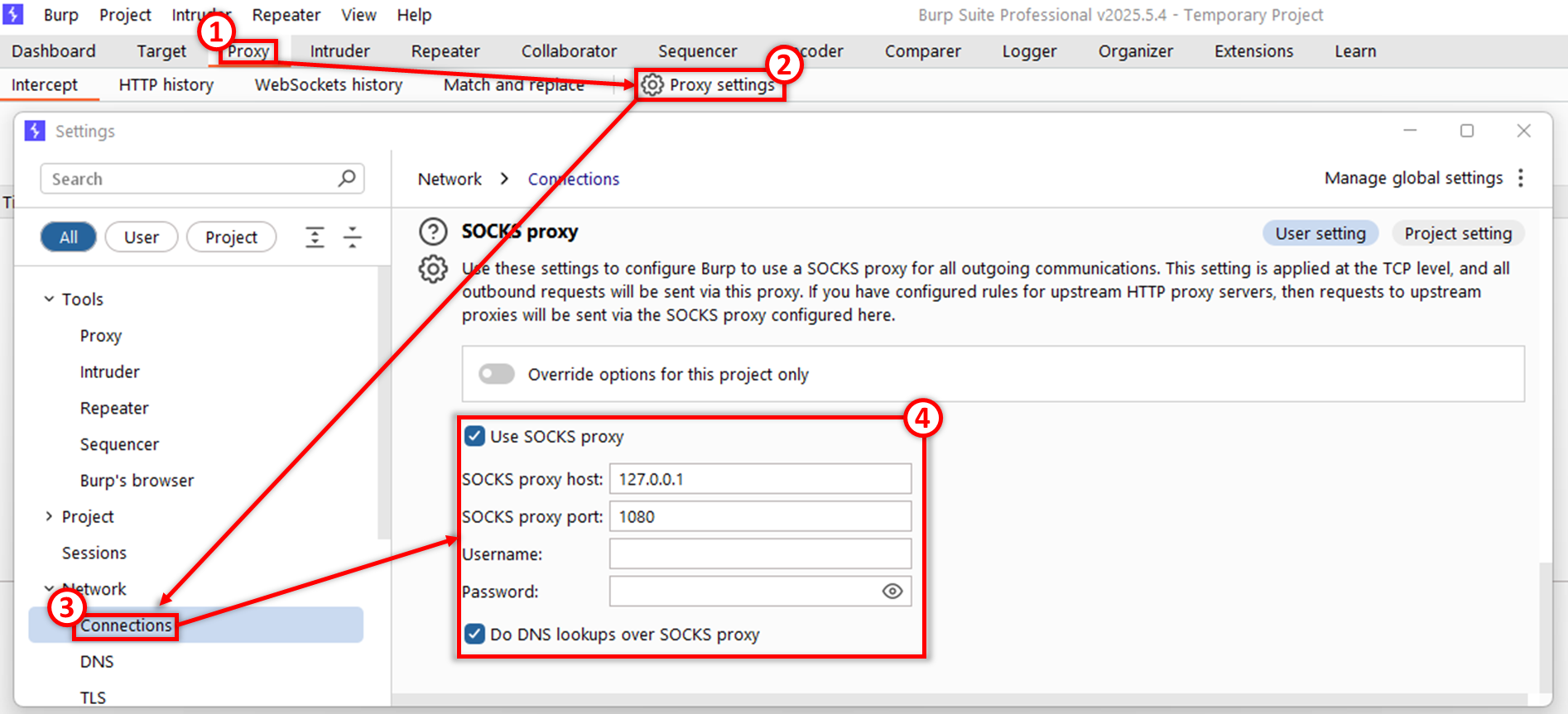
If behind this rebound machine, other servers with web services are accessible, it is possible to configure the Burp Suite to access these services via the proxy SOCKS.
To do this, from the Proxy (1) tab, simply select the Proxy settings (2) option. Then, in the list of available configurations, scroll down to table Network then Connections (3). From here, you can edit Burp's Proxy SOCKS configuration available at the bottom of the (4) page. Before closing the window, check that "Use SOCKS proxy" and "Do DNS lookup over SOCKS proxy" are checked.
Conclusion
The use of soxy demonstrates the limits of networks, even in strictly partitioned environments such as VDI infrastructures with complex filtering rules. These can be circumvented by using specific options in the RDP protocol. By transforming a simple remote desktop session into a gateway, This tool gives listeners the power to explore otherwise inaccessible areas and deploy their offensive arsenal through the tunnel.
This technique also makes it possible to offer different types of missions in the Assumed Breach. If the initial audit conditions are such that an attacker has succeeded in obtaining the login credentials of a user with access to a VDI server. Thus, the audit would focus on the internal resources that are accessible from this instance to assess the risk of this scenario.
The aim of this test is similar to a internal intrusion with the nuance that it will be a little more scripted and composed of pre-defined objectives for the area to be audited. These areas are often overlooked during internal audits, as auditors use other paths that are faster or do not require access to these VDIs.
À propos : Le blog d'AlgoSecure est un espace sur lequel notre équipe toute entière peut s'exprimer. Notre personnel marketing et commercial vous donne des informations sur la vie et l'évolution de notre société spécialisée en sécurité sur Lyon. Nos consultants techniques, entre deux tests d'intrusion ou analyses de risque, vous donnent leur avis ainsi que des détails techniques sur l'exploitation d'une faille de sécurité informatique. Ils vous expliqueront également comment sécuriser votre système d'informations ou vos usages informatiques particuliers, avec autant de méthodologie et de pédagogie que possible. Vous souhaitez retrouver sur ce blog des informations spécifiques sur certains sujets techniques ? N'hésitez pas à nous en faire part via notre formulaire de contact, nous lirons vos idées avec attention. Laissez-vous guider par nos rédacteurs : Alessio, Alexandre, Amine, Anas, Arnaud, Benjamin, Damien, Enzo, Eugénie, Fabien, Françoise, Gilles, Henri, Hicham, Jean-Charles, Jean-Philippe, Jonathan, Joël, Joëlie, Julien, Jéromine, Lucas, Ludovic, Lyse, Matt, Nancy, Natacha, Nicolas, Pierre, PierreG, Quentin, QuentinR, Sébastien, Thomas, Tristan, Yann, Yannick, et bonne visite !